Product · 5 October 2026 · 1 min read
How I built attendance that a friend can't fake
Every college has the same problem. The teacher takes attendance, but again ton of paper work and calculation on which classes i can miss ohh it never made to other end of my mind
By Raaj Patkar

The big picture
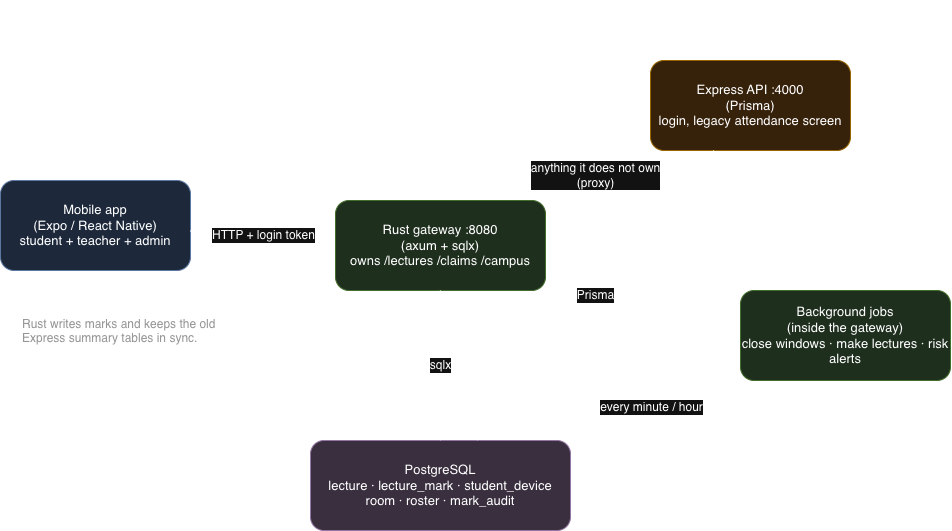
There's one mobile app and it only ever talks to one server: a Rust gateway on port 8080. The gateway handles everything attendance related (/lectures, /claims, /campus). Anything it doesn't handle gets proxied to the older Express backend, which is where login lives.
Both servers read the same Postgres database. That's why the old attendance screen still works. Whenever Rust saves a mark, it also rebuilds the old summary tables (StudentSubjectStat, AttendanceDay), so nothing had to be rewritten.
Why Rust for this part? Marking attendance is the one place where I really care about correctness. Many students tap at the same moment when a window opens, and the checks must be strict. Rust's type checking and sqlx's compile-time-checked queries make me trust that code more.
A lecture has a life-cycle
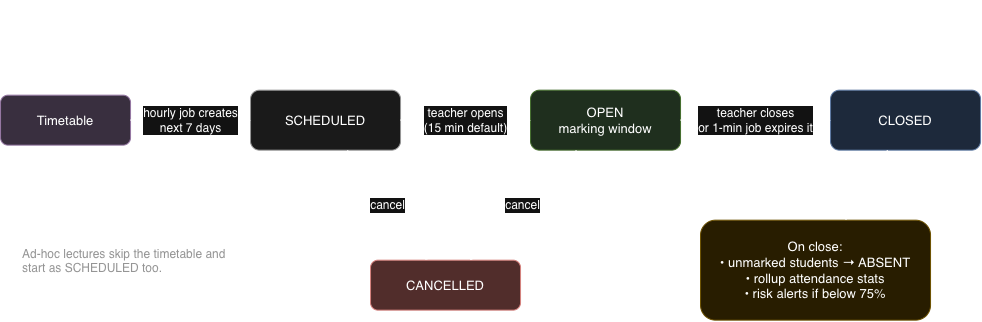
A lecture is a row in the database with a status:
- SCHEDULED: created automatically. An hourly job reads the weekly timetable and creates lectures for the next 7 days. Running it twice is harmless because of
UNIQUE (slot_id, starts_at). - OPEN: the teacher taps Open. A marking window starts (15 minutes by default, 1 to 120 allowed).
- CLOSED: the teacher closes it, or a job that runs every minute closes it when the window runs out. Closing is where everyone without a mark becomes ABSENT, the attendance stats are rebuilt, and students who dropped below the limit get a risk alert.
- CANCELLED: for lectures that never happen.
Teachers can also create an ad-hoc lecture (15 to 240 minutes) for classes that aren't on the timetable.
I liked making the minute-by-minute job do the closing. If a teacher forgets to press Close, attendance is still finalized on time.
The rotating code
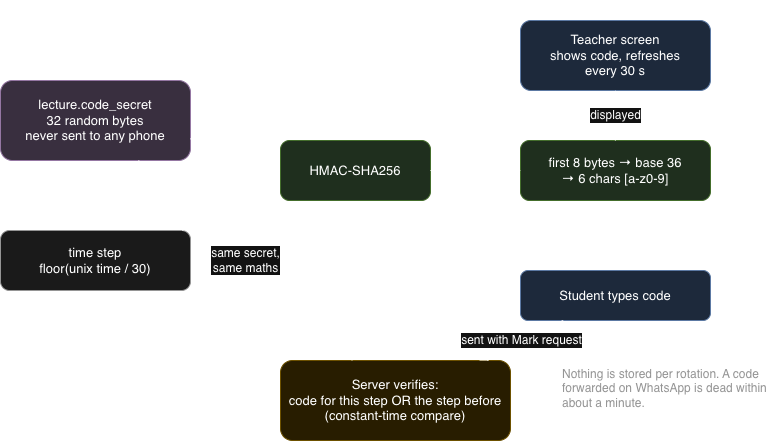
The teacher opens the lecture and the phone shows a 6 character code. It changes every 30 seconds. Students type it in.
It works like the authenticator apps you use for 2FA:
- Each lecture gets its own random 32 byte secret when the row is created. No API ever returns it.
- The code is
HMAC-SHA256(secret, floor(unix_time / 30)), turned into 6 characters ofa-zand0-9. - The server doesn't store any codes. It just recomputes the code for the current time and checks.
Two small decisions that matter:
- It accepts the current code and the one before it. Otherwise a student who is typing exactly when the code flips gets rejected, and that feels unfair.
- The comparison is constant time. The server checks both codes the same way regardless of which one matched, so response time can't leak anything.
The result: if someone photographs the teacher's screen and sends it to a friend outside, it's useless in about a minute.
What happens when a student taps Mark
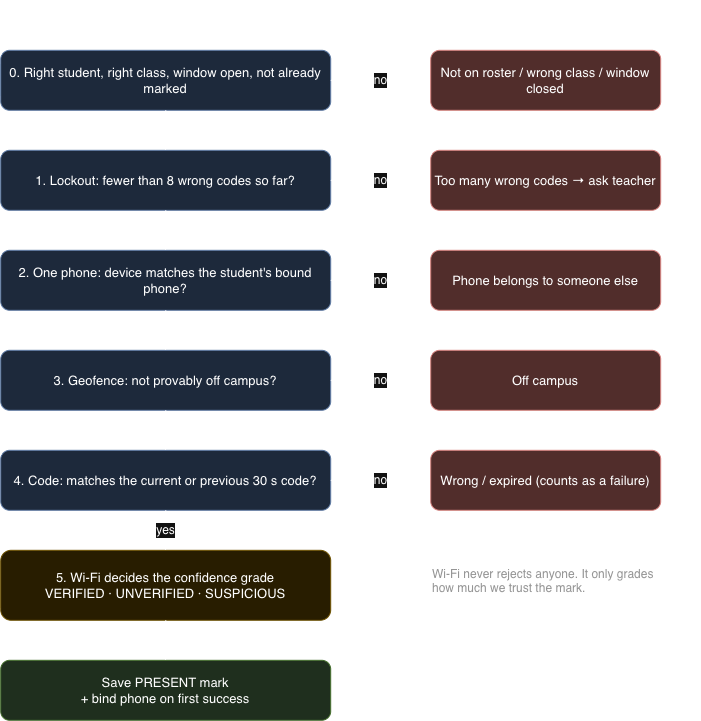
This is the heart of it. Every mark goes through these checks, in this order (mark() in services/ranking/src/routes/lectures.rs):
- Basics. The student is on the roster, belongs to this lecture's class (year, branch, division), the window is open, and they haven't already marked.
- Lockout. After 8 wrong codes for a lecture, they're locked out and have to ask the teacher. A 6 character code has about 2.2 billion combinations, but the lockout means guessing is pointless instead of just unlikely.
- One phone per student. The first successful mark binds the student to their phone. After that, a different phone is refused. A phone already bound to someone else is also refused. This stops one phone from marking a whole row of friends. If a student really changes phones, the teacher can reset the binding.
- Geofence. The phone must be on campus. This is the one hard location rule.
- The code. A wrong code counts as a failure toward the lockout.
- Wi-Fi. This doesn't reject anyone, it only decides the confidence grade.
Geofence: be honest about GPS
GPS indoors is only accurate to tens of metres. That's fine for "on campus" and useless for "in room 402". So the geofence checks the phone's whole uncertainty circle, not just the dot:
- Whole circle inside campus → Inside
- Whole circle outside → Outside, refused
- Circle straddles the boundary → Undecidable, accepted, but the mark can't be fully trusted
I'd rather accept a borderline mark and grade it lower than refuse an honest student standing at the gate.
Wi-Fi: evidence, not a gate
Rooms can be told apart by their access points. Every AP broadcasts the same college network name, so I compare BSSIDs (the AP's hardware address) instead. One physical AP advertises several BSSIDs, and they usually differ only in the last byte, so I compare the first five bytes.
The reference is the teacher's own Wi-Fi scan when they open the window, plus the room's calibrated fingerprint. Weak signals (weaker than -75 dBm) are ignored because they're more likely the room next door.
The result gives each mark a confidence grade:
| Wi-Fi result | Marked as |
|---|---|
| Shares an AP with the room | VERIFIED |
| Phone saw APs, none from this room | SUSPICIOUS |
| No data to compare, but on campus | UNVERIFIED |
I made Wi-Fi a grade and not a rule because iPhones can't scan for networks at all, they only see the one they're connected to. A hard Wi-Fi rule would punish every iPhone user. Suspicious marks are flagged for the teacher, not blocked.
Teachers stay in control
Technology gets it wrong sometimes: dead battery, GPS drift, a student who really was in class. So the teacher can:
- see the live roster as marks come in,
- override a mark to Present, Late or Absent, but a reason is required (at least 5 characters),
- reset a student's phone binding.
Every manual change goes into mark_audit. That table is append-only. A database trigger refuses updates and deletes, so even a bug in my own code can't rewrite history. The HOD can read it, which keeps overrides honest.
Data model
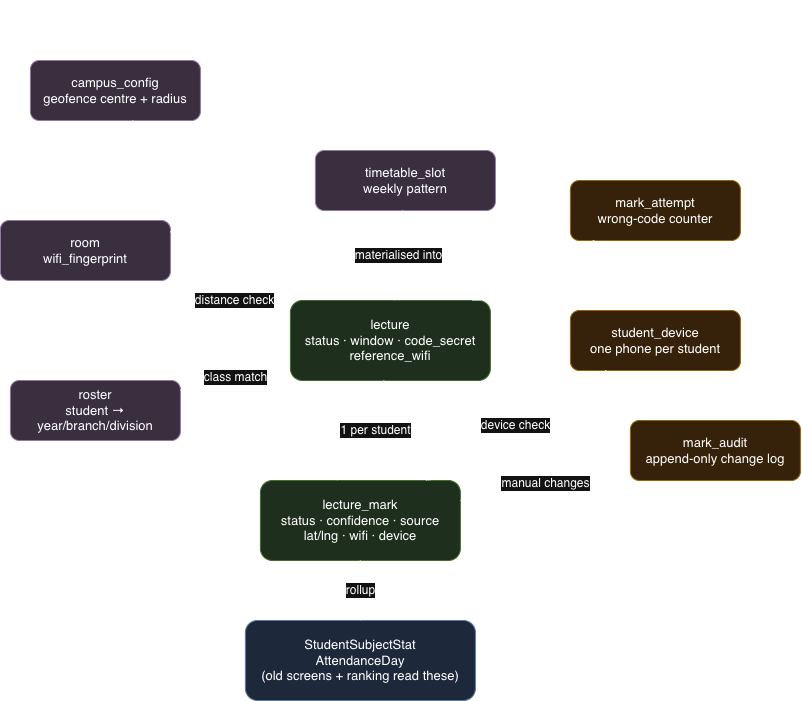
The important idea is that the lecture table holds the secret and the room reference, and lecture_mark holds one row per student per lecture. A mark stores more than "present": the status, the confidence, the source (CODE, OVERRIDE, CLAIM, AUTO_ABSENT), the location, the distance from the campus centre, the Wi-Fi scan, and the device. When something looks odd later, I can see why it was graded the way it was.
OD claims
Students who miss a lecture for a club activity or event can claim On Duty (OD). They upload 1 to 6 photos, and the photo's date and location are checked against the event. A club coordinator or HOD approves.
One rule I'm happy with: OD can fill an absence, but never overwrite a mark where the student actually attended. An approved claim can only ever help a student, never downgrade them.
Export and defaulters
Teachers can export an Excel sheet with the Present / Late / Absent / OD matrix, plus a "Defaulters under 75%" sheet. Below 25% is flagged as "meet parents". The same numbers feed the mentor file and the academics score for ranking.
What I'd say honestly
- This is a prototype. It runs end to end on seeded data, but it hasn't been tested with a whole college.
- A determined cheater with two phones and a friend inside can still beat parts of it. The goal was to make faking harder than attending, not to make it impossible.
- Wi-Fi scanning needs a development build on Android (
react-native-wifi-rebornis native), so it doesn't work in Expo Go.
What I learned
- Grade evidence instead of gating on it. Hard rules on unreliable signals (GPS, Wi-Fi) punish honest students.
- Make the unfair case cheap to fix. A reason-required override plus an audit log lets teachers fix mistakes without anyone losing trust in the data.
- Let the database enforce the rules that matter: unique indexes for one phone per student, a trigger for the append-only log, a check for "no self approval".
- Jobs should be idempotent so a restart or a repeat run never causes damage.
Code lives in services/ranking/ (Rust) and mobile/src/screens/attendance/.
Want the commons. on your phone?
KC students get in first.